External Media (Reference Mode)
Reference mode lets PicPeak import photos from an existing folder, such as a studio library or NAS share, without copying the originals into PicPeak’s storage. You can import a batch manually or let an event watch its folder for new photos.
PicPeak stores references to the originals and generates thumbnails for the gallery. The original files stay in place and must remain readable by the backend. Back up the source library separately.
Configuration
EXTERNAL_MEDIA_ROOT is the library path as seen by the backend process. In Docker, this is the container path, not the host path. The folder picker only browses within that root.
Docker Compose
Add an override such as docker-compose.external-media.yml to your existing stack:
services:
  backend:
    environment:
      EXTERNAL_MEDIA_ROOT: /external-media
    volumes:
      - /path/to/your/photo-library:/external-media:ro
Replace the host path on the left with your library. Apply the override with the same base Compose file you normally use; for the production stack:
docker compose -f docker-compose.production.yml -f docker-compose.external-media.yml up -d backendKeep including the override when you recreate or update the stack. See Docker Configuration.
All-in-one and NAS container UIs
On the all-in-one image, add the same read-only library mount and environment variable to the existing container configuration:
# Additional options for your docker run command
-e EXTERNAL_MEDIA_ROOT=/external-media \
-v /path/to/your/photo-library:/external-media:ro
In a NAS container UI, add /external-media as the container-side volume path, enable read-only access for that mount, and set EXTERNAL_MEDIA_ROOT to /external-media. Keep the existing /data volume for PicPeak’s database, thumbnails and other managed data. The external library is a separate mount.
The backend’s runtime user needs read access to files and permission to traverse the library directories. Mounting the library read-only (:ro) lets PicPeak import references while preventing it from modifying your originals. For a native installation, set EXTERNAL_MEDIA_ROOT to the library’s path on that host.
Reference folders remain local filesystem paths even when STORAGE_BACKEND=s3. A mounted NAS library can therefore be watched on an S3-backed installation too; this is separate from the S3 prefix walker.
Who may use which folder
On stable from v3.134.2 and on the beta channel from v3.167.2-beta.0 (PicPeak PR #1880 ), the mount is not a shared library for every administrator. The SuperAdmin assigns source folders to accounts in the folder picker’s External source owners section: choose a folder, choose an account, then Assign selected folder to this owner.
- An account browses only the folders assigned to it and their subfolders, and can point a gallery only at a folder inside them. Unassigned folders and the mount itself are SuperAdmin-only. Gallery-wide permissions such as
events.manage_alldo not grant folder access. - Assigning a folder to another account transfers it. Source folders must not overlap, so assign separate folders rather than a parent to one account and its child to another.
- Revoke access stops browsing and new bindings. It deletes no files and no gallery photos.
- A gallery keeps working with the folder it already points at, without a grant: whoever may manage the gallery can rescan it, and its watcher keeps running even when its creator is deactivated. Galleries set up before the upgrade therefore need no grants. To detach one, switch it to managed uploads or point it elsewhere.
The API is GET/PUT /api/admin/external-media/sources and DELETE /api/admin/external-media/sources/:sourceId. Review the assignments after restoring a backup onto an instance with a different mount.
Setting up a gallery on a folder
On the beta channel from v3.155.0-beta.0 (PicPeak PR #1747 ) it is one step:
- On the create form, choose Reference external folder in the photo source card and pick the External Folder.
- Leave Import right after creating ticked to import at once, and tick Watch folder for new files if new files should follow by themselves. Both need
photos.upload. - Create the gallery. The import runs in the background and you land on the Photos tab.
For an existing gallery, change the photo source under Settings → Photo source on the gallery page.
The Photos tab of a gallery on an external folder shows a source bar: the folder, whether it is watched, the last scan, Rescan (imports the stored folder again, needs photos.upload) and Change folder (needs events.edit). A failed import shows its reason (“the folder can no longer be found”, “PicPeak is not allowed to read the folder”) with Try again.
On stable:
- Create or open an event and edit its information.
- Set Source Mode to Reference external folder, choose an External Folder, and save.
- Open the event’s Photos tab and select Import from External Folder.
- Confirm the folder and choose Import from selected folder.
What an import takes
The import includes subfolders and accepts .jpg, .jpeg, .png and .webp files. Camera RAW files in an external folder are not imported. Hidden files and folders are skipped. Files already imported into the event are skipped on later passes; the existing duplicate-name rules also apply, so use distinct filenames within each photo type.
On the beta channel from v3.153.0-beta.0, videos are imported too, but only for the extensions on the Allowed File Types list; stable imports photos only. The default list holds no video type, so a library that has always had clips next to its photos is not changed by an upgrade; add mp4, mov or webm to the list and the next manual import, or the next pass over a watched folder, brings the clips in. An imported video gets a poster frame and its runtime, codec and dimensions from FFmpeg, the same as an uploaded one; it is not scanned for faces (PicPeak PR #1738 ).
Wait until your copy has finished before starting a manual import. Automatic watching adds the settling checks described below.
In builds containing PicPeak PR #1809 :
- The folder has to be inside
EXTERNAL_MEDIA_ROOTfor real. A symbolic link that leads outside the root is refused when browsing, importing and serving, and symbolic links inside a folder are not followed. - The photo cap applies. An import stops when the event’s photo cap is reached and reports the rest as skipped.
- Very large trees are cut off. An import reads at most 100,000 entries and 16 folder levels and says so when it stopped there; import the subfolders separately.
Watch a folder for new files
Automatic external-folder watching requires a build that includes PicPeak PR #1345 . Earlier builds support the manual import above but do not have the watch checkbox.
Watching is off for each event by default. On the beta channel, tick Watch folder for new files on the create form, or later under Settings → Photo source on the gallery page. On stable:
- Edit the event’s information and select Reference external folder under Source Mode.
- Choose the folder you want this event to follow.
- Enable Watch folder for new files, beneath the folder picker, and save.
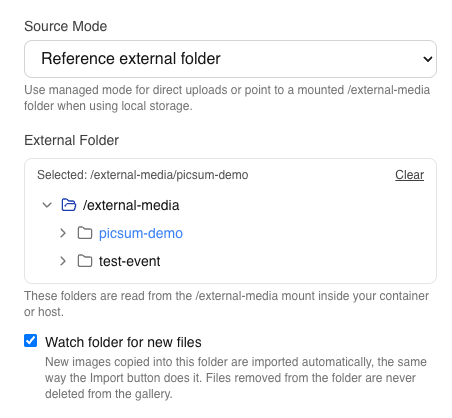
On stable the saved view shows Folder is watched — new files are imported automatically. On the beta channel the source bar on the Photos tab shows Watching for new files.

You need permission to edit the event (events.edit) and upload photos (photos.upload) to enable watching or change the folder while watching remains enabled. The screenshots show an admin with those permissions. Without upload permission, an unchecked watch box is disabled; an event editor can still turn watching off or edit unrelated event details. See Roles & Permissions.
When new photos appear
- After enabling or restarting: the backend checks which events should be watched about once a minute. When it starts watching a folder, it immediately begins an import pass for files already there.
- After copying new files: filesystem notifications trigger a scan after a 10-second quiet period by default. Files must also settle for 5 seconds; automatic passes defer files that were recently modified or are still changing and retry them later. A large batch or slow share takes longer than these delays alone.
- If the share sends no notifications: a full scan runs every 15 minutes by default. This catches files copied to NFS/SMB shares by another machine. For more frequent detection, enable polling.
Each pass checks the selected folder and its subfolders, imports new photos and generates thumbnails. If face recognition is enabled, new imports enter the face-processing queue. The gallery does not need to be open for this to happen.
The manual import remains available while watching is on. Only one import for an event runs at a time, including across backend replicas; if another pass is busy, wait for it to finish before using the button again.
Files edited in place
On the beta channel from v3.174.0-beta.0 (PicPeak PR #2052 ), a scan notices a file that was overwritten at the same path, for example a Lightroom re-export over the proof. It re-reads the file’s dimensions, capture date, camera details and credit, rebuilds the thumbnail at once and the preview, hero and watermarked copies on first view, and drops the prebuilt Download All zip. Faces and scene tags are scanned again where the gallery has them on. A credit or category you set by hand is kept.
- A file counts as changed when its size differs, and from v3.174.1-beta.0 also when its modification time differs, so an edit that keeps the byte count (a rating or keyword written into the file) is noticed too. Photos imported before that version have their modification time recorded on the first scan without being refreshed.
- From v3.174.2-beta.0 an edited video gets a new poster frame, browser-playable copy and stream, and files of a type that has since been removed from the allowed list are still refreshed (never imported new).
- A file still being written is left for the next pass, as for new files.
- Photos replaced by an upload no longer read the share and are not refreshed.
Stable keeps the picture a file had when it was imported.
Deletions and stopping the watcher
Removing a file from the source folder does not delete its gallery record. This prevents a disconnected mount or folder reorganisation from silently deleting gallery entries.
On the beta channel from v3.174.2-beta.0 (PicPeak PR #2127 ) the scan marks such a photo as missing and hides it from guests: it leaves the gallery, the counts and every download. In the admin it carries a File missing pill, and the source bar offers “N files missing” to filter the grid to those photos. A photo comes back by itself once the file returns and has settled; a photo you hid yourself stays hidden. A photo is only marked after a complete scan of a folder that answered and listed files, so an unmounted or empty share marks nothing. Delete the photo in PicPeak if the file is gone for good.
A renamed file is followed: when one photo vanishes and one new file appears in the same pass with the same size, modification time, extension and dimensions, plus the same capture date (photos) or runtime (videos), the existing photo moves to the new path and keeps its feedback, folder and thumbnail. Without those details, for example a photo without a capture date, a rename shows up as a missing photo plus a new import.
On stable a missing original stays in the gallery and may be unavailable for viewing or download; restore the file or mount, or deliberately remove the photo in PicPeak.
Photos deliberately deleted in PicPeak are excluded from subsequent automatic imports for that event and source path, even if the file is still on the share. A manual Import from selected folder can bring those photos back; it clears the exclusion for files it imports. Turning watching off and on does not reset those exclusions.
To stop watching an event, clear Watch folder for new files and save. Existing photos remain in the gallery. Switching to Managed source mode clears the watch setting; archived or inactive events are not watched.
For photos replaced through Lightroom or PicPeak, later scans preserve the replacement rather than adding the referenced original again. See Lightroom round-trip → External media.
NAS shares and polling
Start with the defaults. The 15-minute fallback scan works even when a NAS does not forward filesystem notifications. If you need new files detected sooner on such a share, set:
EXTERNAL_MEDIA_WATCH_POLLING=true
EXTERNAL_MEDIA_WATCH_POLL_INTERVAL_MS=5000
Polling checks file metadata repeatedly and creates more work for large libraries or slow shares. Enable watching only for events still receiving photos. Keep the fallback scan enabled unless you have verified that your mount reliably detects new files.
The updated bundled Compose files forward the standard watcher settings from .env. In a custom Compose file, put them in the backend service’s environment block (or an explicitly loaded env_file); a project .env alone is not automatically passed into a container. For AIO, set the variables on the PicPeak container. Recreate the container after changing environment settings; changing the per-event checkbox only needs a save.
For all options and defaults, see Environment Variables → External-folder watching.
Troubleshooting
| Symptom | What to check |
|---|---|
| The checkbox is missing | Use a build containing PR #1345 and select Reference external folder as the photo source. |
| A folder is not listed in the picker | It is not assigned to your account. Ask the SuperAdmin to assign it under External source owners. |
| The unchecked checkbox is disabled | The role needs photos.upload as well as event-edit permission. |
| The folder picker is empty or the directory cannot be read | Check the host-to-container mount, the container-side EXTERNAL_MEDIA_ROOT, and the backend user’s read/traverse permissions. |
| “Folder is watched” is shown, but no photos arrive | That line reflects the saved setting, not a live health check. Confirm the event is active and not archived, the mount is readable, and the global EXTERNAL_MEDIA_WATCH is not false. Allow for the one-minute configuration check, file settling and, on a share without notifications, the fallback scan. |
| New files arrive only every 15 minutes | The share probably does not provide notifications for remote writes. Enable polling if that delay is too long. |
| One file never appears | Check the supported extension, duplicate filename, whether the copy is still changing, and whether the photo was deliberately deleted in PicPeak. Use manual import only if you intend to restore excluded photos. |
| The manual import reports that another import is running | A background pass or another admin holds the event’s import slot. Try again after it finishes. |
Look for [externalMediaWatcher] in the backend logs. Missing folders are retried during the periodic configuration check. Successful automatic passes that add photos also appear in the activity log as external-media-watcher; scans with no new photos do not add activity entries.