Gallery Management
Galleries in PicPeak are organized as events. Each event has its own slug, password, expiration date, and set of photos organized into categories.
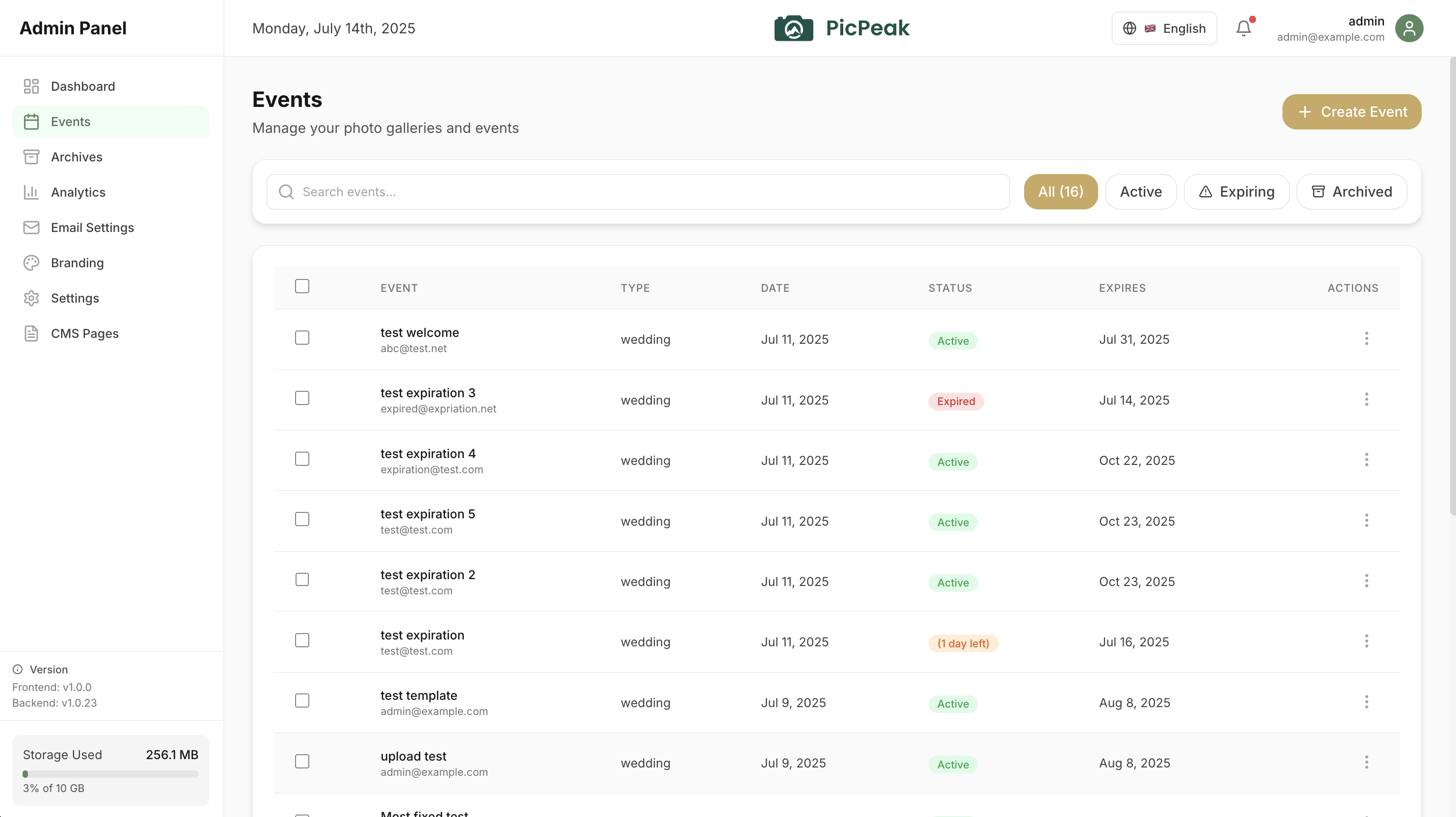
Creating events
From the admin dashboard, create a new event by providing:
- Event type --- wedding, corporate, birthday, portrait, or custom.
- Event name --- displayed as the gallery title.
- Event date --- the date of the event.
- Customer name and email --- used for email notifications.
- Password --- optional; when set, guests must enter it to view the gallery. A single gallery can also hide the logo on the password page (Display logo on password page under Settings → Appearance on the gallery page; the Information card on stable).
- Expiration --- number of days until the gallery expires (default: 30 days).
Each event receives a unique slug and a shareable gallery link.
On the beta channel the create form also picks the photo source (upload, or an external folder with an immediate import) and whether the gallery gets Custom gallery styling or follows the global theme (see Themes & Branding).
The gallery page
On the beta channel from v3.155.0-beta.0 (PicPeak PR #1747 ) a gallery has one page with four tabs and no separate edit mode:
| Tab | What is on it |
|---|---|
| Overview | Share link with password show / reset and resend, short links, QR code, Help the client (send gallery email, extend +30 / +90 days, reveal now), client access, details including download-limit usage, and a setup summary linking into Settings. A draft gallery also gets the Before you share card. |
| Photos (Media once the gallery has videos) | Upload, the photo grid, the categories panel, the folder bar, the external-folder source bar, upload review. |
| Guests & Feedback | The guest list and the feedback panel, including moderation and finished selections. |
| Settings | Sections General, Access, Downloads, Guest interaction, Appearance, Photo source, Folders & delivery, plus Pre-event reminder, Live Slideshow, Faces and Tags when those features are on, and Danger zone (archive, delete). |
Settings sections save together through one save bar, and leaving the page with unsaved changes asks first. Without events.edit (or on an archived gallery) the sections are read-only. The header carries Preview, Send gallery email and a ⋯ menu (rename, duplicate, create invoice, archive).
On stable the same settings are spread over the event’s Information card (edited with Edit) and separate cards for download resolutions, slideshow, reminder override and feedback. Where these docs name a Settings section, look for the matching field there.
Events list
On the beta channel from v3.150.0-beta.0 (PicPeak PR #1717 ) every column header of the events list opens a menu: name (A – Z / Z – A), date (newest or oldest first by event date, or recently / first created), photos (most / fewest), status (active / archived first) and expiry (soonest / latest). The type column filters by event type instead, including types that have since been deactivated. Sorting and filtering run on the server, so they cover every page of the list. Galleries without a date stay at the bottom in both directions. Stable lists events newest-created first.
From v3.164.0-beta.0 the status column also marks galleries waiting for their full delivery, with an Awaiting full gallery filter; see Two-stage delivery.
Publishing
When you publish, the dialog offers Send the gallery email now, ticked by default. Unticking it publishes quietly: the gallery goes live and nothing is sent — no gallery email, no customer notice, no WhatsApp message. Use it when you want the link live before the client hears about it, or when you will tell them yourself.
Afterwards, Send gallery email on the event page (in the header, or under Help the client on the Overview tab) sends the link whenever you are ready. You confirm the password first if the gallery has one. Re-sending to a gallery you already notified is allowed; drafts, expired and inactive events are not.
Previewing as a guest
View Gallery on the event page opens the gallery the way guests see it, skipping the password even on protected galleries and working for drafts. It relies on your admin session, so the URL is useless to anyone who is not signed in as an admin.
The preview follows the admin session timeout: once your admin session has been idle for too long, the gallery shows Your admin session has expired. Sign in again to preview this gallery. with a link to the login page. Browsing the preview counts as activity. (Builds containing PicPeak PR #1497 .)
The preview does not create a guest session and stays out of your statistics: it is not counted in access logs, download counts, per-photo views, or the notification bell.
QR codes and printed cards
The event’s Share link card carries a QR code for the gallery, with a live preview and four downloads: PNG, SVG, Table card (A6) and Poster (A4).
The PDFs contain the event name, the QR code, a caption (“Scan to view & share your photos”) and the share URL, and follow your admin interface language — they are available in English, German, Spanish, French, Dutch, Portuguese, Russian and Slovenian. No logo or branding is applied to them.
Categories
Photos within an event can be organized into categories (e.g., “Ceremony”, “Reception”, “Portraits”). Categories help guests navigate large galleries.
A category can act as a filter, leaving its photos in the main grid, or as a folder, which takes them out of the grid and puts them behind a tile the guest opens. Categories also carry a cover photo, a per-category download permission, and their own order. See Photo Categories & Folders.
Uploads
PicPeak supports drag-and-drop upload directly in the admin panel. Files can also be uploaded via the API.
- Supported image formats: JPEG, PNG, WebP
- Maximum file size: 50 MB per image
- Batch uploads respect the
general_max_files_per_uploadsetting (default: 500) - Thumbnails are generated automatically during upload
Expiration and archiving
When an event reaches its expiration date:
- The gallery becomes inaccessible to guests.
- PicPeak automatically archives the event and its photos to the
events/archiveddirectory.
Expiration warnings can be sent via email before the gallery expires.
On SQLite installs, builds containing PicPeak PR #1788 compare the expiry by its point in time whatever form it was stored in. Before that, a gallery whose expiry had been extended could stay open past its date, miss its warning email, or be listed in the wrong order. The upgrade rewrites stored values once (see Upgrading); galleries that are already past their date expire on the next check after the upgrade.
Guest uploads
Events can optionally allow guests to upload their own photos. This is useful for collaborative events where multiple people contribute photos.
Guest uploads respect the event’s Photo cap: once it is reached, further uploads are refused and the uploader shows a message naming the limit. A guest upload is only filed under the event’s own categories or global ones. (Builds containing PicPeak PR #1495 .)
On the beta channel the upload dialog has a Take a photo button on phones, the gallery can have guest photos scaled down in the browser before upload, and it can hold guest uploads until you approve them. See Gallery Interface → Guest uploads and Moderation.
Uploader names and photo credits
Available on the beta channel in builds containing PicPeak/picpeak PR 1569.
At a wedding or a party with many uploaders, a name on each photo answers the first question everyone asks: who took this? Uploader names, next to the guest upload options on the create form and under Settings → Guest interaction on the gallery page, controls whether the upload dialog asks for one:
| Mode | Upload dialog |
|---|---|
| Off (default) | No name asked, nothing recorded. The behaviour before this feature. |
| Optional | Offers a name field; guests may leave it empty. |
| Required | Uploading is only possible after entering a name. |
The name is the gallery’s guest identity, the same one likes and comments use when guest feedback runs in guest identity mode, so one guest has one name everywhere. It is asked once and remembered on that device; a guest uploading in several batches does not retype it, and Not you? switches to another name on a shared phone. The dialog shows a short notice saying who will see the name.
Show uploader names to guests is off by default: names are recorded for you and for the host (client access), and guests see nothing. Turned on, the lightbox shows “Uploaded by Anna”, and the gallery gets a By filter listing every name with its photo count, plus “Guests without a name” and “Photographer” for the rest.
The switch applies per upload, so a guest who was told the name stays private keeps it private. Other guests see a guest’s name only if the switch was on when that photo was uploaded and is on now. Turning it off hides every name from guests; turning it on later does not reveal names given on earlier uploads. Credits read from EXIF or typed by you follow the current switch alone. The host (client PIN) always sees every name. Names are never sent to the Live Slideshow, slideshow links cannot register a guest name, and names never appear in share-preview (Open Graph) metadata. Names may contain apostrophes (O'Brien); a name that has no displayable characters left after cleaning is refused.
In the admin, every photo carries its credit:
- the photo grid’s list view has a Credit column, and the grid view shows the name on hover
- the filter bar has a credit filter, including “No name”
- the photo viewer can edit or clear a name, and Set name does the same for a selection. A name set by hand is final: nothing read from EXIF replaces it.
- the CSV and JSON photo exports and both feedback exports carry a
creditcolumn, and XMP sidecars write it asdc:creator
Removing a guest (Delete on the Guests & Feedback tab, or the guest’s own “forget me”) removes their name from the photos they uploaded, including a name you typed on those photos by hand; the photos stay. Merging duplicate guests moves their uploads to the kept guest’s name.
Photos you or an import add get their credit from the file: EXIF Artist, then XMP dc:creator, then the name inside Copyright. Guest uploads never read EXIF: phone metadata names the phone’s owner, not the guest. Photos uploaded before this feature have no credit; Settings → Status can read the EXIF credit for them.
Bulk downloads
Guests can download all photos from a gallery (or a filtered subset) as a ZIP archive with a single click. What an archive contains and the 500-photo limit for selections are described under Gallery Interface → Bulk download.
Download limit
A gallery can cap how many photos the client downloads, for packages such as “10 photos included”. Set Download Limit on the create form or under Settings → Downloads on the gallery page (the edit form on stable); empty or 0 means unlimited, which is the default. New events take their value from Event Defaults.
What counts. The limit counts distinct photos and videos. An item uses a slot the first time it is downloaded in any way: single download, Download selected, Download all, or a download at another resolution. Playing a video’s original in the gallery also uses one slot; replays and seeking within that video are free, and a playback that fails gives the slot back. Downloading the same item again is free, so an interrupted or repeated download does not cost anything, and a browser revalidating its cached copy (HTTP 304) never uses a slot. A video used as the hero image shows its poster frame and costs nothing.
Who downloads originals. On a limited event only the client draws on the quota and gets originals: a session logged in with the client PIN or through the customer portal. Share-link guests get preview-size copies (at most 1920 px) from single downloads and ZIPs, cannot download or play videos (“This video is available to the client only.”), and see a preview-size note instead of the counter and the resolution picker. A limited gallery without a password therefore has no client, and every visitor gets preview copies. Your own admin preview is never counted.
What the client sees.
- A counter such as 3 of 10 downloads used above the gallery.
- When selecting items, what the selection costs. Items already downloaded cost nothing. A selection that needs more than is left is flagged before the download starts, and its download button is disabled.
- Download all is disabled while the gallery holds more items than the remaining downloads.
- Once the limit is used up, download buttons are disabled for items not yet downloaded, a refused download shows Download limit reached. Please contact your photographer for more downloads., and a video not yet downloaded shows that message instead of the player.
A download that does not fit is refused as a whole: a ZIP is never delivered with some items silently left out.
Full-size originals. While a limit is set, the lightbox shows the preview version (at most 1920 px) of photos the client has not downloaded, not the original. Otherwise the original would be one “Save image as” away and the limit would not mean anything. Previews and thumbnails never count against the limit, so a photo whose original is no larger than 1920 px is viewable at full size without using a download. A video only loads when the client presses Play, which is what uses its slot; the Premium and Carousel layouts show the video’s poster instead. The live slideshow cannot play videos that are not unlocked yet. If full-size access must be restricted further, cap the download resolution or add a watermark.
Usage and reset. The limit applies to the gallery as a whole, not per session. The event page shows the usage, for example 7 / 10 downloaded (in the details on the Overview tab on the beta channel, next to the download protection badges on stable). To give the client more downloads, raise the limit in the settings. Reset clears the usage: the client gets the full limit back, and photos they already downloaded count again. Lowering the limit below what is already used is allowed; the gallery then shows no downloads left, and nothing already downloaded is taken back. Duplicating an event copies the limit but not the usage. Admins who can see an event but do not own it see the usage but no Reset.
The v1 API accepts download_limit on POST /api/v1/events.
Available on the beta channel in builds containing PicPeak/picpeak PR 1568.
Filtering and search
The gallery interface supports:
- Filtering by likes, ratings, comments, or favorites
- Searching by filename (the original camera filename as well as the stored name)
- Sorting by date, name, size, or rating; name sorts by the original camera filename
- Exporting filtered selections as ZIP or generating Capture One/Lightroom-compatible file lists